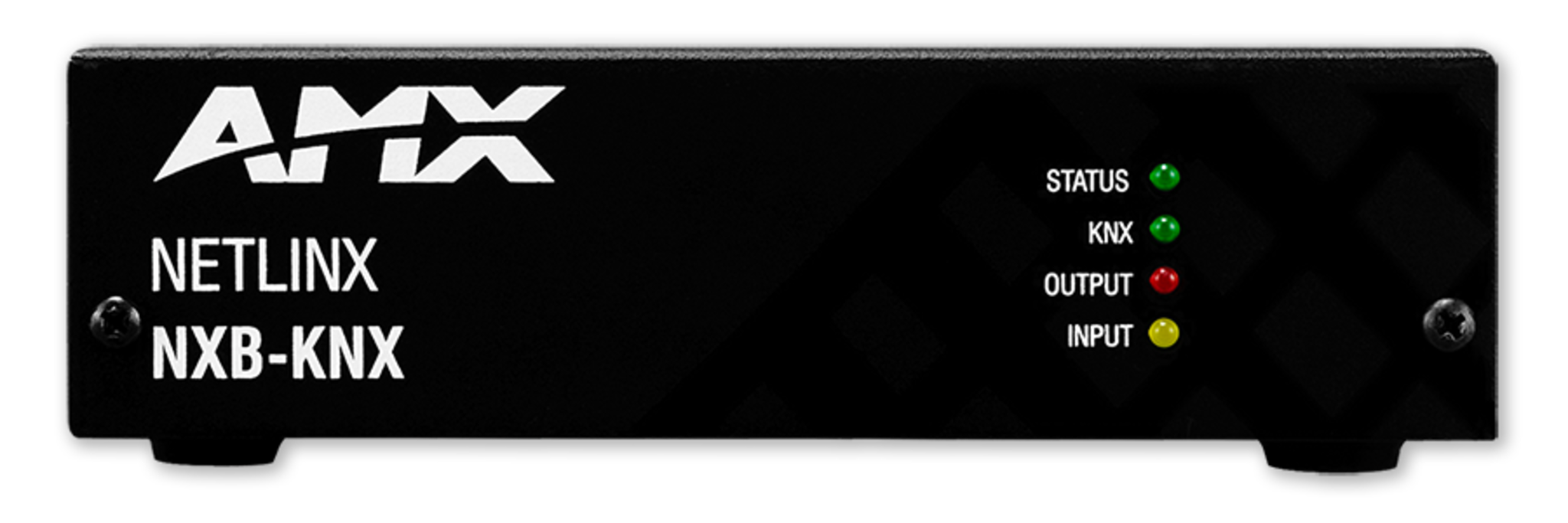
NXB-KNX

KNX Communications Gateway

DescriptionKNX Communications Gateway
Part #FG2031-01

TRAINING AVAILABLE
Learn important installation, configuration and programming techniques in the following course(s) from AMX University:

  • Getting Started with KNX Gateway (Online)

For schedules and registration for these and any AMX University courses, visit www.amx.com/training.

D-Tools Certified Product

This product can be found in the D-Tools manufacturer product database and specified as a third party device when building and proposing a system using D-Tools System Integrator software. D-Tools data includes attributes that make it easier to sell, design, and install systems including: overview, specifications, images, product documentation and more. AMX is a member of the D-Tools Manufacturer Vantage Point (MVP) program designed to provide D-Tools customers the most up-to-date product information.

COUNTRY OF ORIGIN: MEXICO

To satisfy the requirements/regulations of existing or future government programs, this two-letter code is being provided to designate the country of origin for this product.

(Click here for a list of all countries and their respective two-letter code.)

OVERVIEW
Now Enables AMX Control Of KNX Devices
The NetLinx NXB-KNX Communications Gateway allows NetLinx Integrated Controllers the ability to seamlessly control, integrate and communicate with homes and buildings that utilize the KNX communication protocol. KNX is the world's first open, royalty free, and platform independent standard for home and commercial building control.
COMMON APPLICATION
Ideal for building control, ranging from lighting and shade control to various security systems, HVAC, water control, energy management, metering as well as audio and more.

FEATURES

  • Index filtering tables for portability between systems
  • Zero Configuration support for immediate system recognition
  • Two-Way Control
  • Extended data-point type allows time, date, etc. to be captured and used in RMS
  • 64 MB RAM / 256 MB FLASH
  • Ethernet Interface to AMX control equipment

  • Enables AMX control of KNX devices by acting as a gateway between the two protocols and translating NetLinx commands to the KNX protocol
  • Simplifies programming and diagnostics using standard NetLinx commands
  • Can be used as a replacement for other gateways allowing integrators to add the KNX Communications Gateway without writing new code

SPECIFICATIONS

DIMENSIONS (HWD)

  • With feet: 1 5/8" x 5 1/2" x 4 1/8" (4.2 cm x 14.1 cm x 10.4 cm)
  • Without feet: 1 1/2" x 5 1/2" x 4 1/8" (3.9 cm x 14.1 cm x 10.4 cm)
  • RU: 1

WEIGHT
1.45 lbs (0.65 kg)

FRONT PANEL COMPONENTS

  • Status LED (green): Blinks to indicate that the unit has powered up. Any state other than blinking once a second indicates the unit is either not powered, or has not completed boot up
  • KNX LED (green): Solid on indicates power is on and the unit is connected to KNX bus
  • Output LED (red): Lights to indicate traffic from the NXB-KNX to the KNX bus
  • Input LED (yellow): Lights to indicate traffic from the KNX bus to the NXB-KNX

REAR PANEL CONNECTORS

  • KNX 2-pin captive-wire connector
  • Ethernet Port - 10/100 Ethernet with PoE. LEDs show communication activity, connection status, speeds, and mode information:
    - SPD (speed) - Yellow LED lights On when the connection speed is 100 Mbps and turns Off when the speed is 10 Mbps
    - L/A (link/activity) - Green LED lights On when the Ethernet cables are connected and terminated correctly, and blinks when receiving Ethernet data packets

POWER

  • PoE powered - no local Power Supply needed
  • IEEE 802.3af Compliant

MEMORY

  • 64 MB of RAM
  • 256 MB of FLASH

ENVIRONMENTAL

  • Operating Temperature: 32°F to 104°F (0°C to 40°C)
  • Relative Humidity: 5% to 85% non-condensing
  • Intended for indoor use only

CERTIFICATIONS
FCC Class B, CE, IEC60950, RoHS

INCLUDED ACCESSORIES

  • Rubber feet
  • Green 2-Pin 5mm Phoenix connector with captive screws


(Click here for larger PDF image)

Learn important installation, configuration and programming techniques in the following course(s) from AMX University:

  • Getting Started with KNX Gateway (Online)

For schedules and registration for these and any AMX University courses, visit www.amx.com/training.

NAME DESCRIPTION PART #
PS-POE-AF PoE Injector (FG423-80)